Real estate CRM for brokerages Run the whole brokerage from one record.

An app your agents use standing inside the unit, a dashboard your managers run the floor from, and the parts other CRMs leave out: matching with reasons, agent performance and office attendance.

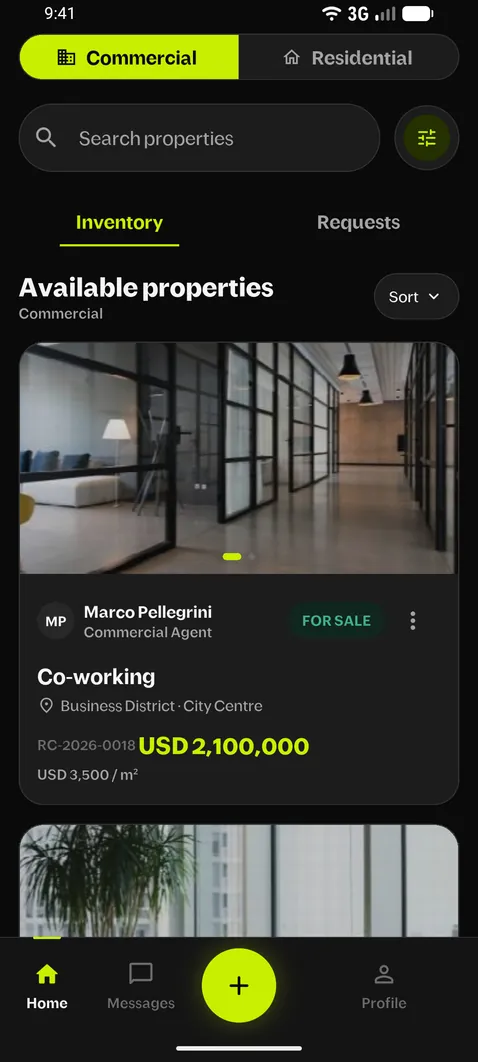
Agent app home: commercial inventory with unit cards and prices
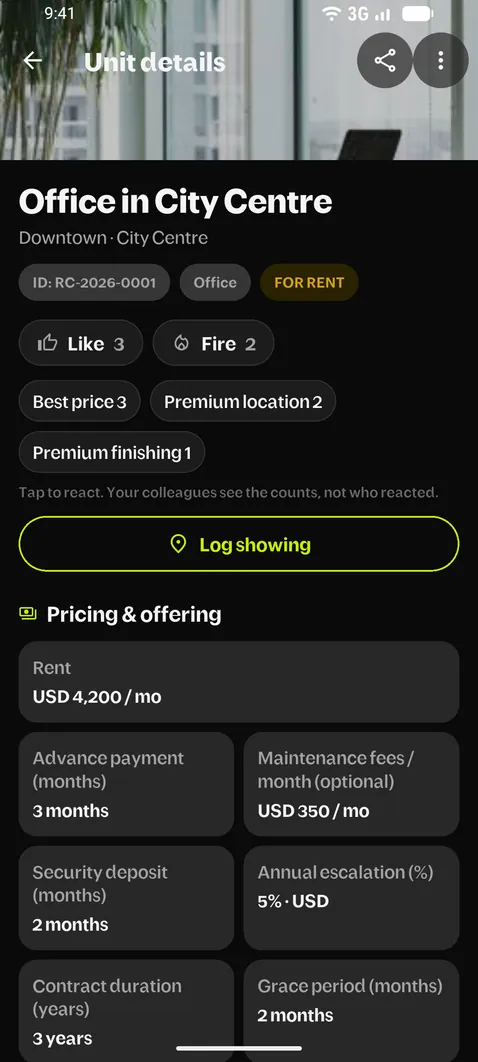
Office in City Centre as a colleague sees it in the agent app: reaction counts and the rent, advance, deposit, escalation and grace period
Agent app home: commercial inventory with unit cards and prices
Company dashboardexample data
Waiting approval4
New leads2
Closed this month11
SLMedical Clinic · 142 m²New unit · Sara L.Review
What other CRMs don't do

Matching, agent performance and attendance, built in.

A general CRM stores contacts and deals. Realcomm also matches your units to your requests, measures every agent against the team, clocks the office in and keeps the field on the record.

01Matching

Unit and request matching, with the reasons.

Every active unit is checked against every active request, automatically. No saved searches to run, no list to remember.

  • Scored 0–100, rankedMust-haves filter first, then district, price and area (within 10 %), finishing and amenities add to the score.
  • The reasons on every matchEach match shows why it fits, so the agent knows what to say before calling.
  • Both agents hear about itThe unit's agent and the request's agent get a notification, and the daily report counts how many matches each agent opened.

Usually: a filter or a saved search someone has to run by hand. Rule-based here, not a black box.

9:41●●● ▮
Matching requests3 · best first
92
REQ-0007 · Office for rentDaniel K. · 180–240 m² · up to USD 4,500 / mo
DistrictPriceAreaFinishing
81
REQ-0012 · Office for rentLeila A. · 200 m² · up to USD 4,000 / mo
DistrictAreaFinishingPrice +5 %
68
REQ-0019 · Co-workingMarco P. · 150–260 m²
PriceAreaOther district
New matching requestnow
REQ-0007 fits your office downtown · score 92

02Agent performance

Every agent, against the team.

One page per agent in the company dashboard, opened from the leaderboard or the team list.

  • Compared, not just countedDeals, leads converted, activities and new listings against the team average or the previous period, with a weekly trend.
  • Yearly targets per agent and per teamFed only by confirmed deals. A deal can have several agents; finance confirms each one's commission and target credit.
  • A leaderboard everyone seesAgents see the Top agents podium in the app; commission amounts never appear on it.

Usually: a sales report per user. Team averages, shared deals and targets take spreadsheets.

03Attendance & HR

Office attendance in the same app.

Your agents clock in on the phone they already sell from. Managers see who is in without another HR system.

  • Geofence clock-in at several officesClock in and out only inside an office's radius, with a schedule per agent and late or early flags.
  • Leave, permission hours and correctionsRequested in the app, approved in one queue; a corrected punch keeps the original on record.
  • Penalties and a payroll sheet exportYour penalty table applied per month and exported for payroll. Payroll itself stays in your payroll tool.

Usually: a separate attendance app with its own staff list, and nothing linking it to sales.

9:41●●● ▮
Good morning, Sara
Inside the Downtown office · 40 mIn since 09:04
Office radius 150 m
Clock out
Schedule09:00 – 17:00
Annual leave left14 days
Permission hours this month2 of 4
Today · who's inDowntown · Harbour
18In
2Late
3Leave
1Absent
LA
Leila A. · 2 h permissionThu 14:00 – 16:00
Approve
04Field & data protection

The field on the record, the owner off it.

You see where the work happened without asking for a report, and your owners' numbers stay inside the company.

  • Showings with one GPS readingLogged from the unit with the request it was for and a note, and an automatic daily report per agent with a map of the day's showings.
  • Consent-first share linksOne unit or 2–10 in one link. The client gives a name and phone and accepts your terms first; links switch off after 7 days.
  • Owner contact by roleEach role sees what it should, finance sees numbers masked, and a disputed owner becomes a conflict case settled in an in-app chat.
How owner data is protected
The life of one unit

One office downtown, start to signature.

i.Chapter 01 / 06

Listed from the field.

Sara adds the office while she's standing in it. Every floor gets its own area and price per square metre. She sets the licence type and the full rent terms, and records a walkthrough video on her phone, compressed to 720p and resumed if the signal drops.

  • Advance 3 months
  • Insurance 2 months
  • Yearly increase 10%
  • Price per m² per floor
  • Video · 720p
ii.Chapter 02 / 06

Approved before it's public.

Commission is a percentage or a fixed amount, with your company's defaults filled in. Anything different goes to a manager for approval, and each agent has a cap on units per location. Sara gets the answer as a notification.

iii.Chapter 03 / 06

Shown, and on the map.

Sara shows the office to Tom, who runs a design studio. The showing is logged with one GPS reading, the request it was for and a short note, and lands in her My day and in the team's daily report with a map of every showing.

iv.Chapter 04 / 06

Matched, with the reasons.

The moment the office goes live, the open requests that fit appear, scored 0–100 with the reasons they matched. Both agents get a notification, and the daily report shows how many matches each agent opened.

v.Chapter 05 / 06

Shared, on your terms.

Send one unit, or a presentation of 2–10 units as a single link. Before the client sees anything, they give their name and phone and accept your terms, and the consent is recorded in the dashboard. The owner never appears. The link expires in 7 days unless Sara extends it from My shared links.

vi.Chapter 06 / 06

Closed, shared, counted.

Sara marks it rented and picks the request that took it. Daniel brought the tenant, so both are on the deal. Finance confirms each agent's commission and target credit, which counts toward the yearly targets of every agent and team and the Top agents podium in the app.

For owners and managers

The floor, from your chair.

Everything agents do in the app shows up here as it happens. You approve, assign and track results from one screen.

Listed64
Matched41
Showings23
Closed11
Closed deals per week W1 – W8
W1W2W3W4W5W6W7W8
Agents this month
SLSara L.18 listed · 4 closed80%
DKDaniel K.14 listed · 3 closed62%
LALeila A.11 listed · 2 closed45%

Example data

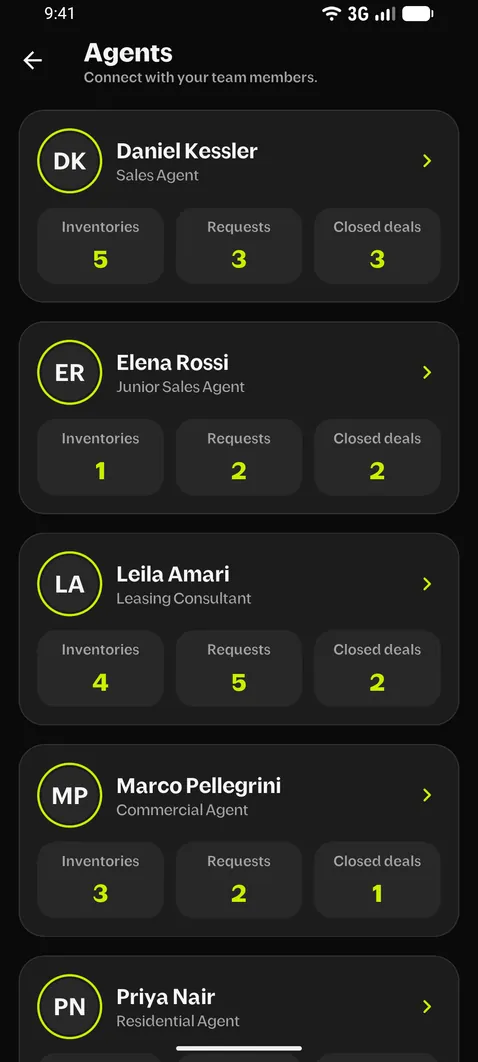
Agents screen in the app listing each agent with counts of inventories, requests and closed deals
Who it's for

Everyone who touches the deal works in one place.

Owners & managers

Run the floor.

  • One approvals queueNew units, commission exceptions, status changes and deals.
  • Home: what needs you todayPending approvals, open conflicts, unassigned leads and attendance gaps first.
  • Pipeline and analyticsRequests by stage, results per agent and per section.
  • Conflict casesTwo agents claim the same owner? The conflict team settles it in an in-app chat.
Agents in the field

Sell from the phone.

  • Units with photos and videoRecorded on the phone, 720p, resumable upload.
  • Matches with reasonsKnow why a request fits before you call.
  • Links and presentationsOne unit or 2–10 in one link, consent first, extend from My shared links.
  • Showings with GPSOne location reading and a note with each showing, and My day at a glance.
  • Activity logCalls, WhatsApp messages and notes kept on the record.
Operations & HR

Keep it running.

  • Bulk importYour data-entry team loads and checks units from a spreadsheet.
  • Leads inboxMeta Lead Ads and landing pages, duplicate check by phone, round-robin assignment.
  • AttendanceGeofence clock-in at several offices, schedules, corrections.
  • Leave & penaltiesLeave types, permission hours and penalties as company settings you edit; employee files.
  • Payroll sheet exportAttendance and penalties exported, ready for your payroll.
How it compares

Built for brokerages, not adapted to them.

A general CRM can be configured for real estate, and portal tools are built around listings. Realcomm starts from how a brokerage runs its floor: listings, requests, agents in the field and the office behind them.

What you needRealcommGeneric CRMsPortal agent tools
Unit ↔ request matchingScored 0–100 with the reasons; both agents notified; matches opened counted per agentBuilt inAdd-on or custom setupPartly
Agent performance profileEach agent against the team average or the previous period, with a weekly trendBuilt inPartlyNot designed for it
Office attendance and HRGeofence clock-in at several offices, schedules, leave and permission hours, corrections, penalties, payroll sheet exportBuilt inNot designed for itNot designed for it
Showings in the fieldLogged with one GPS reading; an automatic daily report per agent with a mapBuilt inAdd-on or custom setupNot designed for it
Shared deals and targetsSeveral agents on one deal, commission confirmation, yearly targets, leaderboardBuilt inPartlyNot designed for it
Owner phone visible by role onlyMasked for finance; no downloads or exports for agentsBuilt inPartlyNot designed for it
Consent before a shared link opensClient gives name and phone and accepts your terms; records keptBuilt inNot designed for itNot designed for it
Approvals and commission rulesApproval for non-default commission, unit caps per agent per locationBuilt inAdd-on or custom setupNot designed for it
Commercial unit fieldsFloors with their own area and price per m², licence type, yearly rent increase, income property with a sitting tenantBuilt inAdd-on or custom setupPartly
Bulk import for data entryLoad and review the inventory before agents get accessBuilt inUsually availablePartly
Getting startedReady for brokeragesTypically weeks of configurationReady, but built around listings
Built inPartlyAdd-on or custom setupNot designed for it
Category-level comparison of typical setups; individual products vary.
Owner data

Your owners stay your owners.

An owner's number is the most valuable thing your brokerage holds and the easiest thing to lose. Realcomm treats it that way.

  • Phone reveal by roleEach role sees what it should. Finance sees numbers masked.
  • No downloadsAgents can't download PDFs or export lists.
  • Imported numbers don't lingerPhone cells in imported spreadsheets are scrubbed after 7 days.
  • Client links expireShared links switch off after 7 days unless extended.
  • Disputes have a processA disputed owner becomes a conflict case, settled with the agents in an in-app chat.
  • Leavers are out immediatelyDeactivate a user and the app signs them out on their next tap.
JB
Owner · Office, DowntownAdded by Sara L. · Confidential
Your role can't see this
Viewed bySara L. · Adam (manager)
Glass-walled office corridorOpen office with desksBright lounge area
Going live

Agents open the app to a full inventory.

1

Load your inventory

Your data-entry team imports existing units from a spreadsheet template and reviews them before anyone else has access.

Data entry
2

Draw your company

Commercial and Residential sections, managers, roles and approval rules, including who sees owner phone numbers.

Owner & managers
3

Hand out the app

Agents sign in with their work email and start listing, matching and sharing on day one.

Agents
Questions

Before you book.

Does it handle residential as well as commercial?

Yes. Commercial and Residential are separate sections. Agents assigned to both get both tabs; everyone else opens straight into theirs.

Can we bring our existing Excel inventory?

Yes. Units are imported from a spreadsheet template, so your data-entry team can load and check them before agents get access.

What happens when an agent leaves?

Deactivate the user in the dashboard. The app signs them out on their next action, and the units, requests and history stay with the company.

Can several agents share one deal?

Yes. The agent who closes it picks everyone who worked the deal, and finance confirms each one's commission and target credit. Confirmed deals count toward agent and team targets and the leaderboard.

Does it cover office attendance?

Yes: geofence clock-in at your offices, schedules, leave and permission hours, corrections, penalties and a payroll sheet export. Payroll calculation itself isn't part of it yet.

Is the matching AI?

No. It's rule-based: must-haves filter first, then district, price, area, finishing and amenities give a score from 0 to 100, and every match shows its reasons.

Can managers see how each agent is doing?

Yes. Each agent has a profile in the dashboard with deals, leads, activities and listings against the team average or the previous period, a weekly trend, and their yearly target.

Is it in Arabic?

The mobile app and the dashboards are in English today. Arabic is coming.

Do Facebook leads come in automatically?

Leads from Meta Lead Ads and your own landing pages go to one inbox, are checked against existing contacts by phone, and are assigned to your agents in rotation.

Book a demo

30 minutes with your managers. We load a few of your real units so you see your own inventory, not ours.

Agents on your team (optional)
You mainly broker
0 / 1 000
We use these details only to arrange the demo.